The full platform.
On every site.

Your first site and your fiftieth get the same things: our own WordPress dashboard, a built-in speed cache, a firewall, nightly malware scans and backups, and a private test copy. Micro runs your site on one server; Standard runs it on at least two and adds extra power by itself when you’re busy. The only extra is storage over 10 GB (€0.10 per GB + VAT).

Built for WordPress, not for servers

Most hosts give you Plesk or cPanel: good tools for running a server, where WordPress is one app among many. Our dashboard only manages WordPress sites, so the things you do every day are one click away.

You want to…Grandhosting dashboardA typical Plesk or cPanel host
Log in to WordPressOne click from your dashboard, no password to shareLog in to the panel first, then open WordPress from its tools
Test an update firstA private test copy of every site, then publish itPossible with extra tools on some plans, otherwise a manual copy
Get last night’s site backPick any of the last 30 nightly backups, restore in one clickA backup tool or a support request, depending on the plan
Know the site is downUptime alerts built inUsually a separate service you set up yourself
Find out why something brokeError and visitor logs for each site, in the dashboardFind the log file in a file manager
See what the firewall blockedEvery blocked request listed; allow a false alarm in one clickUsually hidden; open a ticket
Handle a busy dayExtra power starts by itself on StandardUpgrade to a bigger plan
Know what each site costsCost per site, with a spending limit and alertsOne invoice for the whole plan

Plesk and cPanel are solid tools for servers. The difference is what each one is made for.

Built to be fast — and to stay fast under load

Speed isn't a premium tier. Every site gets the same speed cache and separate image storage, and on Standard it gets extra power by itself when it's busy.

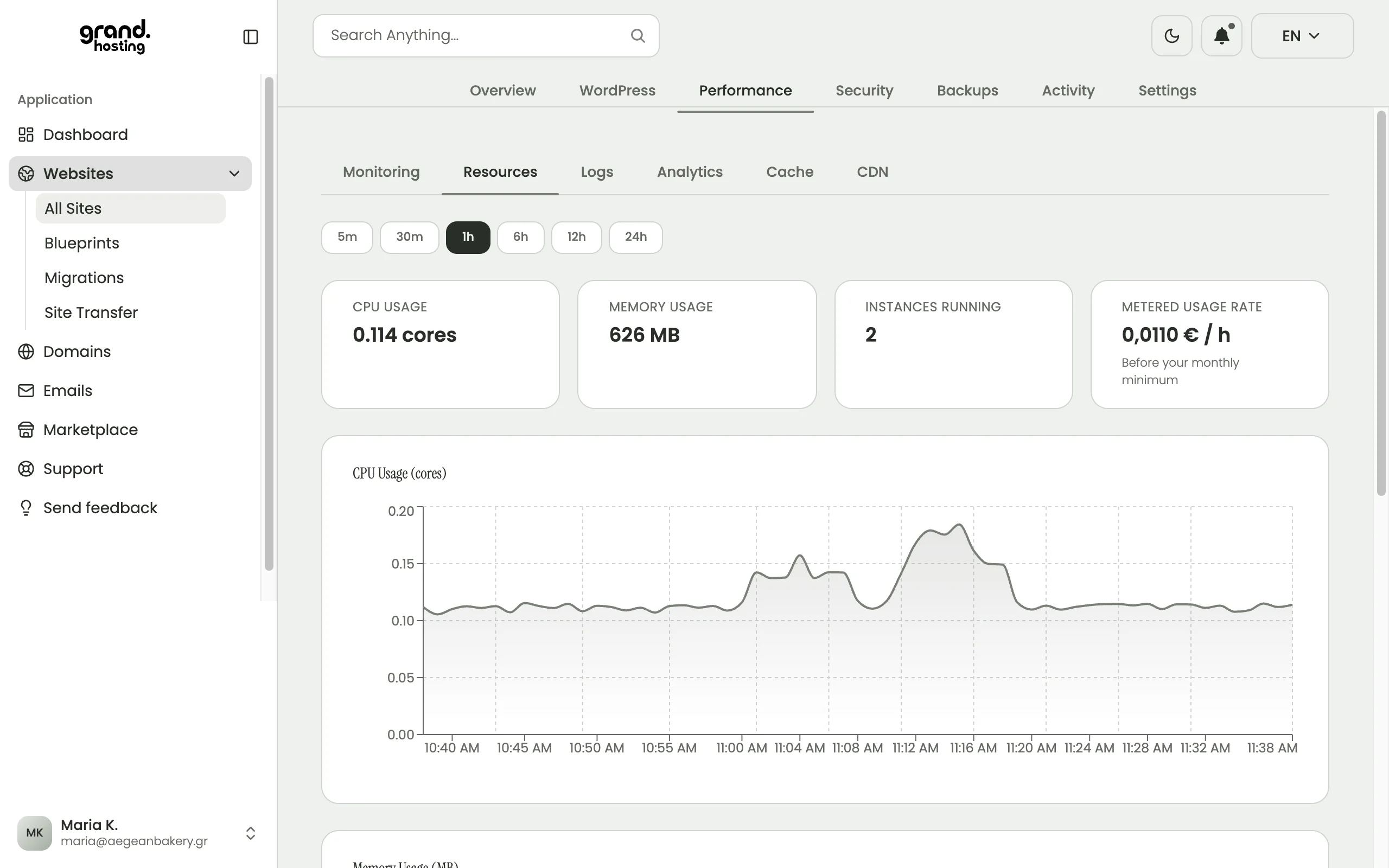
Grandhosting dashboard: CPU and memory use, instances running and the usage rate per hour for a site
What a site uses right now: CPU, memory, how many copies are running, and what that costs per hour. Example data.

Extra power when you're busy

On Standard your site always runs on at least two servers, and when traffic climbs, extra copies start by themselves and are removed when it settles. You pay by the hour for what's used. A Micro site runs on one server.

Images on separate storage, optional CDN

Your images and uploads don't live on the web server. They're kept on separate, replicated storage and served straight from it, so pages load faster and nothing is lost if a server fails. You can also switch on a CDN for any site (off by default).

CDN caching, never for logged-in pages

With the CDN on, images and static files are also served from locations across Europe, including Greece. Logged-in pages, carts, checkout and wp-admin are never served from a saved copy, so they always show live data.

Built-in speed cache (Redis)

Redis keeps the answers to repeated database questions in memory, along with visitor sessions, so pages load without asking the database every time. It's installed and connected on every site.

Reserved resources

Every site gets its own reserved CPU, memory and storage. No shared pool: another site's busy day doesn't slow yours down.

Protection built into every layer

Security isn't an upsell. From the firewall in front of your site to login protection inside WordPress, every site is protected by default.

A firewall that blocks hacking attempts

A web application firewall (WAF) runs in front of every site and blocks common attacks and vulnerability scanners before they reach WordPress. It's on for every site, with nothing to set up.

See what was blocked

Every request the firewall blocked is listed in your dashboard. If it caught something of yours by mistake, allow it with one click instead of opening a ticket.

Brute-force login protection

Repeated failed logins are blocked automatically. Every attempt (address, username, time and outcome) is kept in a login history you can read at any time.

Hide your login URL

Move wp-admin and wp-login to a custom address of your choosing. Bots hammering the default login page simply find nothing.

Nightly malware scanning

Every site is scanned every night and again whenever a plugin is installed. Findings raise an alert and appear in your dashboard.

Free SSL

Every site gets an SSL certificate that is set up and renewed by itself. HTTPS is on from the moment you go live, with nothing to configure.

Site isolation

Each site runs sealed off, with its own database, and can't reach any other site. A problem on one site stays on that site.

Never lose work — and reuse your best setups

Nightly and on-demand backups, one-click restore, and reusable site templates so you never start from scratch.

Grandhosting dashboard: a list of automatic nightly backups, one per night
A backup every night, kept for 30 days. Restore any of them in one click. Example data.

Automatic daily backups

Your database and files are backed up every night and kept for 30 days, on storage separate from your site, in the EU. Always a recent restore point, with nothing to set up.

On-demand backups

Take a manual backup any time — before a big update, a plugin change, or a risky edit — with one click.

One-click restore

Roll any site back to a previous backup straight from the dashboard. No exports, no FTP, no support ticket.

Reusable site templates (Blueprints)

Save any site as a template, then create new sites from it in minutes. A template is kept separately from the original site, so it stays available even if that site is deleted. Handy for starting every client from the same base.

Clone from a backup

Launch a fresh site from any existing backup. Ideal for duplicating a proven setup or branching off a copy to experiment safely.

Everything WordPress needs, managed for you

Updates, test copies, email, logs and database access: the day-to-day of running WordPress, from one dashboard.

Managed WordPress

WordPress core and PHP are kept up to date for you, with no downtime while it happens. WordPress core runs from a clean, protected copy, so a tampered core file doesn't survive a restart.

Plugin & theme updates

Update plugins and themes for any site from your Grandhosting dashboard, without logging in to each wp-admin one by one.

One-click login to WordPress

Open any site's WordPress admin from your dashboard with one click. No passwords to remember, share or reset.

phpMyAdmin access

Full access to your MariaDB database through phpMyAdmin, one click from your dashboard. No separate passwords to manage.

Order and password emails that arrive

Every site can send email from the moment it goes live, with no plugin and no outside account to set up. Password resets, order receipts and form notifications reach the inbox from day one. (Mailboxes on your own domain are a separate product.)

Access & error logs

Visitor and error logs for every site, in the dashboard. Find out why something broke without digging through files.

WordPress debug logs

Switch on WordPress debug mode when you need it and read the debug log in your dashboard. Find the misbehaving theme or plugin, then switch it off again.

Search engine indexing

Decide when search engines may list your site. Keep it private while you build, then switch it on when you're ready to launch.

A private test copy (staging)

Copy your live site to a private test copy in one click, try changes safely, then publish them to the live site when you're ready.

Always know how your sites are doing

Uptime, traffic, and resource usage for every site — in one dashboard, no extra tools to install.

Grandhosting dashboard: uptime and response-time monitoring for a site
Uptime and response time for a site, built into the dashboard. Example data.

Uptime monitoring

Every site is checked around the clock. If it goes down, you get an alert, and so do we.

Traffic & analytics

See visits, page views and traffic trends for each site in the dashboard. No outside script to install.

Server usage

See each site's CPU, memory and bandwidth use as it happens, so you know how it's performing and what it's using.

Designed so one failure isn't your failure

On Standard your site keeps running if a server fails, and your database has a live copy ready to take over. See the full picture on our reliability page.

Automatic database failover

Your site has its own database, and a live copy is kept on another server. If the main one fails, the live copy takes over by itself, with no action from you. In our tests that took about 14 seconds, with no lost writes.

Every copy in step

On Standard your site runs on more than one server, and they stay in step: a plugin install, theme change or update is applied once and reaches every copy within seconds. Shops and membership sites can switch on Strict mode so every visitor always sees the latest data.

Pay-as-you-go, with no runaway bills

Usage-based pricing should never mean nasty surprises. See, limit, and cap what every site spends — all optional, all from your dashboard.

Live usage & projection

See real-time, month-to-date spend for each site and your whole account — plus a projected month-end total, so the end of the month never surprises you.

Spending alerts

Set a threshold in euros or as a percentage, per site or account-wide, and we email you the moment spend reaches it — or when it's projected to.

Hard spending caps

Set the most you want to spend, per site or for the whole account. Usage never bills beyond your limit (your plan's monthly minimum always applies). Raise or remove the limit and the site is released within an hour; otherwise it resumes by itself next month.

Auto-recharge

Top up your prepaid wallet automatically when the balance runs low, at a threshold you set — so your sites never get interrupted over a few euros.

Pay only for what you use

A small monthly price per site (the minimum) plus the server usage it actually has, counted by the hour. No fixed package to outgrow, no bandwidth metering, no overage penalties.

Technical details

What runs every site, for the developer or agency evaluating us. More on How it works, Security and Reliability.

Grandhosting dashboard: choose the PHP version for a site, from 7.4 to 8.4
Pick the PHP version for each site, from 7.4 to 8.4, and change it any time. Example data.

Web server and PHP

OpenLiteSpeed with LiteSpeed PHP. Logged-in pages, carts and checkout are never served from a saved copy, so they always show live data.

PHP extensions

GD, SOAP, BCMath, intl and zip on every site, plus what common WordPress and WooCommerce plugins expect.

Database

Your own MariaDB database, with phpMyAdmin opened from your dashboard in one click. A live copy takes over by itself if the main one fails: in our tests about 14 seconds, with no lost writes.

Speed cache

Redis object cache and sessions on every site, kept separate per site, installed and connected for you. If the cache is ever unreachable, the site keeps working from the database.

Media storage

Images, PDFs and downloads live on separate, replicated storage in the EU, not on the web server, and are served straight from it without going through WordPress or PHP.

Access

A WP-CLI terminal over SSH with your own SSH keys, a browser WP-CLI console, phpMyAdmin, and one-click login to wp-admin. No SFTP.

Updates

WordPress core runs from a clean, protected copy. WordPress, PHP and platform updates roll out with no downtime.

Security

A firewall in front of every site, malware scans every night and on every plugin install, login protection, and each site sealed off from every other.

Location

Hosted mainly in Germany, always within the EU, in ISO 27001-certified data centres. With the CDN switched on, images and static files are also served from locations across Europe, including Greece.

Auto-scaling (Standard)

Your site gets more power by itself when it’s busy, and you only pay for the hours it’s used.

More copies when you're busy

When traffic climbs, extra copies of your site start by themselves on other servers and share the visitors. When the rush is over, they're removed again.

Always at least two

On Standard your site always runs on at least two servers at once, so one failing doesn't take it offline.

No plan to outgrow

There's no fixed package to upgrade when you grow. If your site ever needs more room than usual, we arrange it on request.

Every copy in step

All copies run the same plugins, theme and media. A plugin install or update reaches every copy within seconds, and you can switch on Strict mode so every visitor always sees the latest data.

Pay for the busy hours only

Billing is by the hour, with your monthly price as the minimum. A three-day campaign costs you three busy days, not a bigger plan all year. Set a spending limit if you like.

Micro runs on one

Micro (€3.49 a month + VAT) runs your site on a single server with no auto-scaling. Switch a site to Standard (€5.99 a month + VAT) at any time.

Where the hosting itself differs

The dashboard is one half. The other half is what happens to your site underneath it, on a busy day and on a bad one.

Grandhosting and a typical host
 GrandhostingA typical host
Your site runs on more than one server at onceYes, on Standard, and keeps running if one failsUsually one server
A busy day arrivesOn Standard, extra power starts by itself, then goes away againYou move to a bigger plan
What you pay forThe hours of server usage your site has, from €3.49/mo + VATA fixed package, paid up front
You need more storage€0.10/GB + VAT over the 10 GB included, added automaticallyMove up to a bigger plan

Compared against the publicly published plans of the largest Greek hosts. Offerings change, so check theirs before you decide. For side-by-side comparisons with named hosts, with sources and dates, see our comparisons.

To be straight with you

Plenty of what gets sold as a feature is simply expected now. Free SSL, backups, one-click WordPress, a test copy, malware scanning, free migration: most established hosts include these, and so do we. Don’t choose a host on any of them.

Choose on what happens when your site gets busy, or breaks at 3am.

“But my developer knows cPanel”

Nothing underneath is proprietary. It is standard WordPress on standard parts: WP-CLI over SSH with your own keys, a browser WP-CLI console and phpMyAdmin are all there when you want them. The dashboard just means you need them less often.

And if you ever want to leave: take a full backup and go. Your database and your files, in standard formats. No exit fee, no lock-in. We would rather keep you because the platform is better.

Try it all, free

Build on the full platform before you pay anything. We’ll even move your existing sites for you.

A free demo site, no credit card

Spin up a full-featured site and build for free: 30 days for founding members, 14 days standard — no credit card, no billing details. If you decide not to continue, it’s simply deleted; nothing to cancel, nothing to pay. Create a free site →

Free managed migration

Already hosting elsewhere? We move your sites — files, database, DNS, SSL — with zero downtime. Learn about migration →

Your data in the EU

Hosted mainly in Germany, always within the EU, in ISO 27001-certified data centres. Backups stay in the EU too.

No feature gates. The features on this page come with every site, whether it’s your first or your fiftieth. Running on more than one server and extra power when you’re busy come with Standard. The only extra is storage over 10 GB, at €0.10 per GB + VAT.

Frequently asked

What's the difference between managed WordPress hosting and plain web hosting?Σε τι διαφέρει το managed WordPress hosting από το απλό web hosting;

With plain web hosting you get space on a server and a control panel, and the rest is on you: updates, speed, security, backups and handling busy days. Managed WordPress hosting takes care of that for you: WordPress and PHP updates, a built-in speed cache, a firewall that blocks hacking attempts, nightly malware scans, nightly backups and, on Standard, extra power by itself when you're busy. On Grandhosting every site also runs sealed off with its own reserved resources, so another site's busy day or security problem doesn't reach yours.

Με το απλό web hosting παίρνεις χώρο σε έναν server και ένα control panel, και τα υπόλοιπα είναι δική σου δουλειά: ενημερώσεις, ταχύτητα, ασφάλεια, backups και οι μέρες με πολλή κίνηση. Το managed WordPress hosting τα αναλαμβάνει για σένα: ενημερώσεις WordPress και PHP, ενσωματωμένη cache ταχύτητας, firewall που μπλοκάρει απόπειρες hacking, νυχτερινό έλεγχο για κακόβουλο λογισμικό, νυχτερινά backups και, στο Standard, επιπλέον ισχύ αυτόματα όταν έχεις κίνηση. Στο Grandhosting κάθε site τρέχει επίσης απομονωμένο, με δικούς του δεσμευμένους πόρους, ώστε η κίνηση ή ένα πρόβλημα ασφαλείας ενός άλλου site να μη φτάνει στο δικό σου.

What makes my site fast?Τι κάνει το site μου γρήγορο;

Every site gets a built-in speed cache (Redis), images and files served from separate storage instead of the web server, an optional CDN you can switch on per site, and modern PHP on an OpenLiteSpeed web server, with CPU and memory reserved for your site alone. On Standard, when your site gets busy it gets extra power by itself and gives it back when the rush is over. None of this is a paid add-on.

Κάθε site έχει ενσωματωμένη cache ταχύτητας (Redis), εικόνες και αρχεία που σερβίρονται από ξεχωριστό αποθηκευτικό χώρο αντί για τον web server, προαιρετικό CDN που ενεργοποιείς ανά site, και σύγχρονη PHP σε web server OpenLiteSpeed, με CPU και μνήμη δεσμευμένες μόνο για το site σου. Στο Standard, όταν το site σου έχει πολλή κίνηση παίρνει αυτόματα επιπλέον ισχύ και την επιστρέφει όταν περάσει. Τίποτα από αυτά δεν είναι πληρωμένο add-on.

How is security handled?Πώς διαχειρίζεστε την ασφάλεια;

It's on for every site, with nothing to set up: a firewall that blocks hacking attempts before they reach WordPress (you can see every blocked request in your dashboard and allow a false alarm with one click), malware scans every night and whenever a plugin is installed, protection against password-guessing with a full login history, an option to hide your login page, and free SSL certificates that renew by themselves. Each site is also sealed off from every other site.

Είναι ενεργή σε κάθε site, χωρίς καμία ρύθμιση: firewall που μπλοκάρει απόπειρες hacking πριν φτάσουν στο WordPress (βλέπεις κάθε μπλοκαρισμένο αίτημα στο dashboard σου και επιτρέπεις έναν ψευδή συναγερμό με ένα κλικ), έλεγχος για κακόβουλο λογισμικό κάθε νύχτα και σε κάθε εγκατάσταση plugin, προστασία από δοκιμές κωδικών με πλήρες ιστορικό συνδέσεων, επιλογή απόκρυψης της σελίδας σύνδεσης, και δωρεάν πιστοποιητικά SSL που ανανεώνονται μόνα τους. Κάθε site είναι επίσης απομονωμένο από όλα τα άλλα.

Founding Member pricing.
Yours while you stay.

From €3.49/mo + VAT — pay only for what your site actually uses. Founding-member pricing stays locked for as long as your account remains active.

Early access means direct access to our team. You’re not a ticket number. You’re a founding partner.

No commitment and no card to start. Takes a minute.

Create your account →

Already hosted elsewhere? Managed migration, zero downtime →